SSO Explained: Step-by-Step Implementation with Keycloak, Django and OpenID Connect
How SSO works, SAML vs OAuth 2.0 vs OpenID Connect, and a step-by-step Keycloak and Django setup with two apps sharing one login. Tested in real Chrome.
Introduction
Single Sign-On (SSO) lets a user log in once and then use several applications without logging in again. One trusted service checks who the user is; every connected application trusts that service.
You already use SSO every day. Sign in to your company's Microsoft or Google account in the morning, and email, chat, the HR portal and the wiki all open without another password.
Traditional authentication vs SSO:
- Traditional: every application has its own login page, its own user table and its own passwords. Ten apps means ten passwords, ten places to reset them and ten places to remove a user who leaves.
- SSO: applications hand login over to one central Identity Provider. The user has one account and one password. Turning that account off removes access to every connected application.
This guide explains how SSO works, the protocols behind it (SAML 2.0, OAuth 2.0 and OpenID Connect), and then builds a working setup: Keycloak as the Identity Provider and two Django apps that share one login.
How SSO Works
- The user opens an application, for example the Employee Portal.
- The application has no session for this user, so it redirects the browser to the Identity Provider (IdP).
- The user logs in at the IdP: password, and MFA if enabled. The IdP remembers this with its own session cookie.
- The IdP redirects back to the application with an authentication response. In OpenID Connect this is a one-time authorization code, which the app exchanges for tokens.
- The application validates the response: signature, issuer, audience, expiry and nonce. Then it creates its own local session.
- The user opens a second application. It also redirects to the IdP, but the IdP already has a session, so it sends the user straight back with a new code. No password is asked.
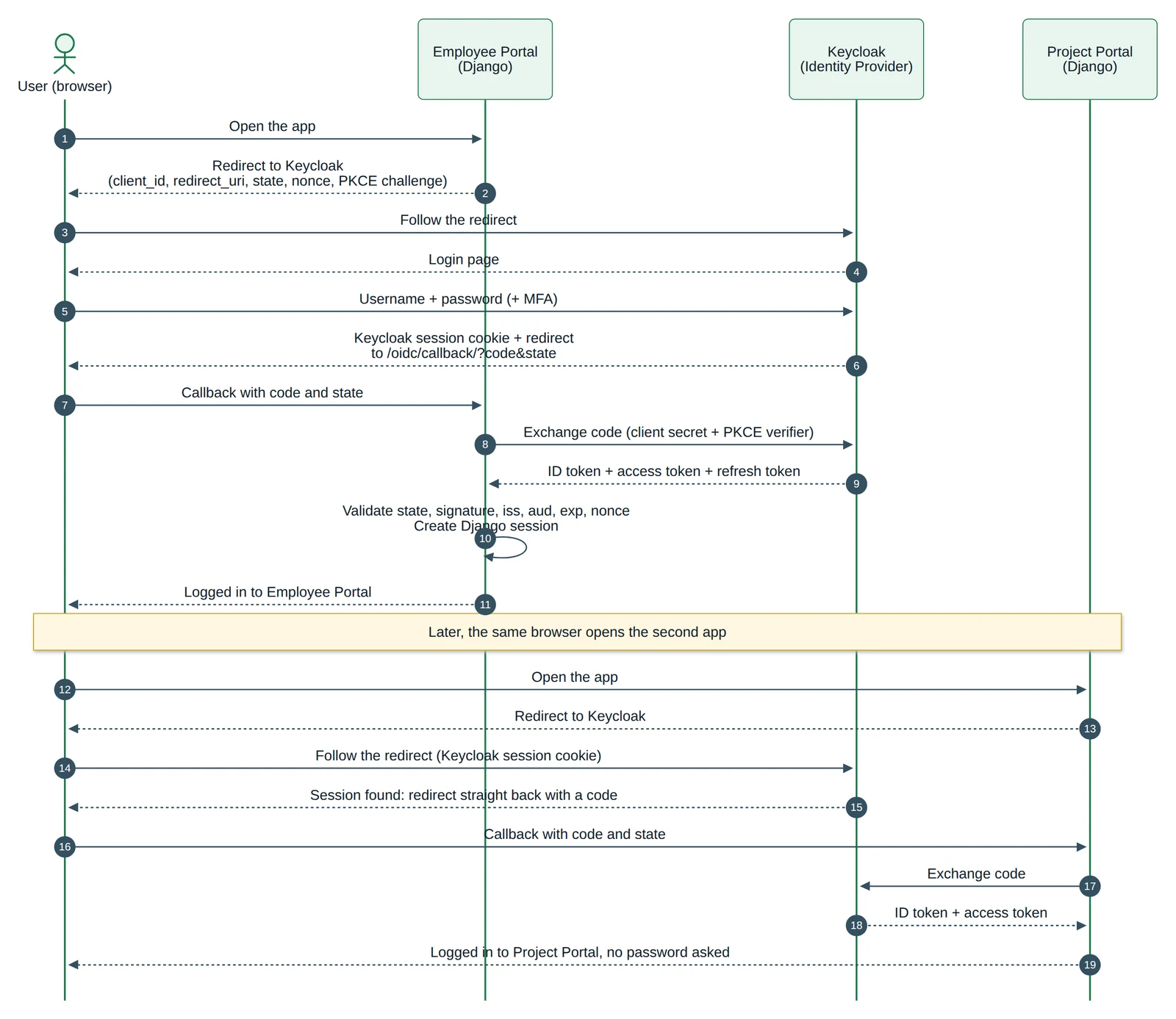
The key idea: there are two kinds of session. The IdP session (a cookie on Keycloak's domain) makes SSO possible. Each application also keeps its own local session (a Django session cookie). They expire and end independently, which matters for logout.
Important SSO Concepts
- Identity Provider (IdP): the service that authenticates users and issues identity information. Examples: Keycloak, Microsoft Entra ID, Okta, Google.
- Service Provider (SP) / Relying Party (RP): the application that trusts the IdP. SAML calls it a Service Provider; OpenID Connect calls it a Relying Party. In this guide, each Django app is an RP.
- Authentication vs authorization: authentication answers "who are you?"; authorization answers "what are you allowed to do?". SSO is mainly about authentication.
- SAML 2.0: an older, XML-based standard for exchanging authentication data. Still common in enterprise software and older corporate systems.
- OAuth 2.0: an authorization framework. It lets an app get an access token to call an API on a user's behalf. On its own it does not define how to identify the user, so it is not an authentication protocol.
- OpenID Connect (OIDC): an identity layer on top of OAuth 2.0. It adds the ID token, a signed JSON Web Token (JWT) that says who the user is and how they logged in. OIDC is what you use for "log in with" and SSO in modern web apps.
- ID token: for the application. It proves who the user is. Validate it; do not send it to APIs.
- Access token: for APIs. It is sent as
Authorization: Bearer ...to call protected APIs. Short-lived. - Refresh token: used to get new access tokens without asking the user to log in again. Keep it on the server only.
- Single Logout (SLO): logging out of one application also logs the user out of the others. Harder than it sounds (see Step 7).
- Multi-Factor Authentication (MFA): a second proof of identity, such as a one-time code. With SSO, you enable MFA once at the IdP, and every application gets it without code changes.
SAML vs OAuth 2.0 vs OpenID Connect
| SAML 2.0 | OAuth 2.0 | OpenID Connect | |
|---|---|---|---|
| Purpose | Authentication (and attributes) | Authorization: access to APIs | Authentication, built on OAuth 2.0 |
| Message format | XML assertions | Access tokens (format not fixed) | JWT ID tokens + OAuth 2.0 tokens |
| Typical use | Enterprise SSO into older or corporate apps | Letting an app call an API for a user | Login and SSO for web and mobile apps |
| Mobile and SPA friendly | Poor | Yes | Yes |
When to use each: choose OpenID Connect for new web and mobile applications. Use SAML when an enterprise customer or an existing product only supports SAML. Use plain OAuth 2.0 when an app needs to call an API on a user's behalf; if you also need to know who the user is, that means OIDC.
Real-World Use Cases
- Corporate applications with one company login. HR, payroll, wiki and ticketing tools all trust the company IdP. A new employee gets one account; a leaver is disabled in one place.
- Log in with Google or Microsoft. Consumer apps accept an existing account instead of creating a new password.
- Internal applications behind a central IdP. A company's own services (admin panels, dashboards, internal tools) share one realm and one login.
- Enterprise applications with Keycloak. Keycloak is an open-source IdP you host yourself. It supports OIDC and SAML, MFA, user federation from LDAP or Active Directory, and brokering logins to Google or Microsoft.
For users, SSO means fewer passwords and fewer login screens. For administrators, it means one place to create and disable users, enforce password and MFA policy, and review login events.
Implementation with Keycloak and Django
We will build two Django apps that share one login:
| Application A | Application B | |
|---|---|---|
| Name | Employee Portal | Project Portal |
| URL | http://localhost:8001 | http://localhost:8002 |
| Keycloak client ID | employee-portal | project-portal |
| Callback URL | http://localhost:8001/oidc/callback/ | http://localhost:8002/oidc/callback/ |
Both use the same Keycloak realm (acme), with a separate OIDC client each. They use the Authorization Code Flow with PKCE, and Authlib, a maintained OAuth and OIDC library, handles the protocol details.
Step 1: Start Keycloak
Action: run Keycloak locally in development mode.
docker run -d --name keycloak -p 127.0.0.1:8080:8080 \
  -e KC_BOOTSTRAP_ADMIN_USERNAME=admin \
  -e KC_BOOTSTRAP_ADMIN_PASSWORD=admin \
  quay.io/keycloak/keycloak:26.8.1 start-dev
Explanation: start-dev runs Keycloak over plain HTTP with a local development database and relaxed defaults. 127.0.0.1: keeps it reachable from your machine only. The two variables create a temporary admin account.
Expected result: after about 10 seconds the log shows Keycloak 26.8.1 on JVM ... started and Running the server in development mode. DO NOT use this configuration in production. Open the admin console at http://localhost:8080/admin and log in as admin / admin.
Step 2: Create a realm
A realm is an isolated space in Keycloak with its own users, clients, roles and login settings. Users in one realm cannot log in to clients in another. The built-in master realm is for administering Keycloak itself; create a separate realm for your organisation.
Action: in the admin console, click Manage realms, then Create realm, enter acme, and click Create.
Expected result: acme is the current realm. Its OIDC discovery document is now at http://localhost:8080/realms/acme/.well-known/openid-configuration:
issuer                  http://localhost:8080/realms/acme
authorization_endpoint  http://localhost:8080/realms/acme/protocol/openid-connect/auth
token_endpoint          http://localhost:8080/realms/acme/protocol/openid-connect/token
jwks_uri                http://localhost:8080/realms/acme/protocol/openid-connect/certs
end_session_endpoint    http://localhost:8080/realms/acme/protocol/openid-connect/logout
Your app only needs this one URL; Authlib reads the endpoints from it.
Step 3: Create the OIDC clients
A client is an application registered with Keycloak.
- A confidential client runs on a server and can keep a secret (a Django app). It authenticates to Keycloak with a client secret.
- A public client cannot keep a secret, because its code runs on the user's device (a single-page app or mobile app). It relies on PKCE instead.
Our Django apps are confidential clients. We also turn on PKCE (Proof Key for Code Exchange): the app sends a hashed random value with the login redirect and the original value when it exchanges the code. A stolen authorization code is then useless without that value. Current OAuth security guidance recommends PKCE for all clients.
Action: in realm acme, go to Clients, then Create client:
- Client type: OpenID Connect. Client ID:
employee-portal. Click Next. - Capability config: turn Client authentication on (this makes it confidential). Under Authentication flow, keep only Standard flow checked (the Authorization Code Flow). Turn on Require PKCE and set PKCE Method to
S256. Click Next. - Login settings: set Valid redirect URIs to
http://localhost:8001/oidc/callback/and Valid post logout redirect URIs tohttp://localhost:8001/logged-out/. Click Save. - Copy the client secret from the client's Credentials tab.
You can change these later on the client's Settings tab, where Keycloak 26.8 groups them under Access settings (redirect URIs, web origins) and Capability config (client authentication, flows, PKCE).
Repeat for project-portal with port 8002.
Web origins controls which origins may call Keycloak from browser JavaScript (CORS). Our apps talk to Keycloak only from the server, so it can stay empty. Set it only for browser-based clients.
The same setup with Keycloak's admin CLI, which is useful for scripts:
kcadm.sh create clients -r acme -s clientId=employee-portal -s protocol=openid-connect \
  -s publicClient=false -s standardFlowEnabled=true \
  -s directAccessGrantsEnabled=false -s implicitFlowEnabled=false \
  -s 'redirectUris=["http://localhost:8001/oidc/callback/"]' \
  -s 'attributes={"pkce.code.challenge.method":"S256","post.logout.redirect.uris":"http://localhost:8001/logged-out/"}'
Expected result: two clients, each with its own secret, exact redirect URIs and PKCE required.
Step 4: Create a test user
Action: in realm acme, go to Users, then Create new user. Enter username asha, email asha@acme.example, first name Asha and last name Kumar, and turn Email verified on. Click Create. On the Credentials tab, set a password and turn Temporary off, so Keycloak does not force a password change at first login.
Expected result: user asha can log in to any client in the acme realm.
Step 5: Create the Django applications
Action: create one project per app. Both are identical; only their environment variables differ.
employee_portal/            project_portal/ (same files)
├── .env                    ├── .env
├── manage.py               ├── manage.py
├── config/                 └── ...
│   ├── settings.py
│   └── urls.py
└── accounts/
    ├── oauth.py
    ├── urls.py
    ├── views.py
    └── templates/accounts/
        ├── home.html
        └── logged_out.html
python -m venv .venv && source .venv/bin/activate
pip install "django==6.1.2" "authlib==1.9.1" requests
django-admin startproject config employee_portal
cd employee_portal && python manage.py startapp accounts
Authlib's Django client uses requests for HTTP calls.
Configuration from environment variables (employee_portal/.env; never commit this file):
APP_NAME="Employee Portal"
DJANGO_SECRET_KEY=change-me-to-a-long-random-value
DJANGO_DEBUG=1
DJANGO_ALLOWED_HOSTS=localhost
OIDC_CLIENT_ID=employee-portal
OIDC_CLIENT_SECRET=paste-the-secret-from-keycloak
OIDC_SERVER_METADATA_URL=http://localhost:8080/realms/acme/.well-known/openid-configuration
SESSION_COOKIE_NAME=employee_sessionid
CSRF_COOKIE_NAME=employee_csrftoken
project_portal/.env uses APP_NAME="Project Portal", OIDC_CLIENT_ID=project-portal, its own secret and project_sessionid / project_csrftoken.
The important parts of config/settings.py (the rest is Django's default):
import os
from pathlib import Path

BASE_DIR = Path(__file__).resolve().parent.parent

SECRET_KEY = os.environ["DJANGO_SECRET_KEY"]
DEBUG = os.environ.get("DJANGO_DEBUG") == "1"
ALLOWED_HOSTS = os.environ.get("DJANGO_ALLOWED_HOSTS", "localhost").split(",")

APP_NAME = os.environ.get("APP_NAME", "Employee Portal")

INSTALLED_APPS = [
    "django.contrib.auth",
    "django.contrib.contenttypes",
    "django.contrib.sessions",
    "django.contrib.messages",
    "django.contrib.staticfiles",
    "accounts",
]

# --- Authentication -------------------------------------------------------
LOGIN_URL = "login"

OIDC = {
    "client_id": os.environ["OIDC_CLIENT_ID"],
    "client_secret": os.environ["OIDC_CLIENT_SECRET"],
    "server_metadata_url": os.environ["OIDC_SERVER_METADATA_URL"],
}

# --- Sessions and cookies -------------------------------------------------
# Both demo apps run on "localhost", and browsers share cookies across ports,
# so each app needs its own cookie names.
SESSION_COOKIE_NAME = os.environ.get("SESSION_COOKIE_NAME", "sessionid")
CSRF_COOKIE_NAME = os.environ.get("CSRF_COOKIE_NAME", "csrftoken")
SESSION_COOKIE_AGE = 8 * 60 * 60          # local session lasts one working day
SESSION_COOKIE_HTTPONLY = True            # default; JavaScript cannot read it
SESSION_COOKIE_SAMESITE = "Lax"           # default; needed for the IdP redirect back
SESSION_COOKIE_SECURE = not DEBUG         # HTTPS-only cookies in production
CSRF_COOKIE_SECURE = not DEBUG
SECURE_SSL_REDIRECT = not DEBUG
Explanation:
- Secrets come from the environment and the app refuses to start without them. In production, inject them from your platform's secret store, not a file.
- Separate cookie names matter for local testing. Browsers scope cookies by host name, not by port. With both apps on
localhost, a sharedsessionidcookie would overwrite the other app's session. In real Chrome, the cookie list showedemployee_sessionidandproject_sessionidside by side onlocalhost. SameSite=Laxlets the session cookie survive the top-level redirect back from Keycloak.Strictwould drop it and break the login.- Django's default database-backed sessions keep tokens on the server. Do not switch to cookie-based sessions here.
Run each app with its environment loaded, on its own port:
set -a && . ./.env && set +a
python manage.py migrate
python manage.py runserver 8001     # project_portal: 8002
Expected result: http://localhost:8001/ responds with a redirect to /oidc/login/?next=/.
Step 6: Login and callback handling
The OIDC client (accounts/oauth.py):
from authlib.integrations.django_client import OAuth
from django.conf import settings

oauth = OAuth()
oauth.register(
    name="keycloak",
    client_id=settings.OIDC["client_id"],
    client_secret=settings.OIDC["client_secret"],
    server_metadata_url=settings.OIDC["server_metadata_url"],
    client_kwargs={
        "scope": "openid email profile",
        "code_challenge_method": "S256",  # PKCE
    },
)
server_metadata_url lets Authlib discover every endpoint and the signing keys. The openid scope makes this an OpenID Connect login, so Keycloak returns an ID token.
The views (accounts/views.py):
import logging

from authlib.integrations.base_client.errors import OAuthError
from django.conf import settings
from django.contrib.auth import get_user_model
from django.contrib.auth import login as django_login
from django.contrib.auth import logout as django_logout
from django.contrib.auth.decorators import login_required
from django.http import HttpResponseBadRequest
from django.shortcuts import redirect, render
from django.urls import reverse
from django.utils.http import url_has_allowed_host_and_scheme
from django.views.decorators.http import require_POST

from .oauth import oauth

log = logging.getLogger(__name__)
User = get_user_model()


def login(request):
    """Send the user to Keycloak. Authlib adds state, nonce and the PKCE challenge."""
    next_url = request.GET.get("next", "/")
    if not url_has_allowed_host_and_scheme(
        next_url, allowed_hosts={request.get_host()}, require_https=request.is_secure()
    ):
        next_url = "/"
    request.session["post_login_redirect"] = next_url

    redirect_uri = request.build_absolute_uri(reverse("oidc_callback"))
    return oauth.keycloak.authorize_redirect(request, redirect_uri)


def callback(request):
    """Keycloak sends the user back here with ?code=...&state=..."""
    issuer = oauth.keycloak.load_server_metadata()["issuer"]
    claims_options = {
        "iss": {"essential": True, "value": issuer},
        "aud": {"essential": True, "value": settings.OIDC["client_id"]},
    }
    try:
        # Checks state, exchanges the code (with the PKCE verifier) for tokens,
        # and validates the ID token: signature, iss, aud, exp, iat, azp and nonce.
        token = oauth.keycloak.authorize_access_token(request, claims_options=claims_options)
    except OAuthError as exc:
        log.warning("OIDC login failed: %s", exc.error)
        return HttpResponseBadRequest("Login failed. Please try again.")

    claims = token.get("userinfo")  # the validated ID token claims
    if not claims:
        return HttpResponseBadRequest("Login failed. Please try again.")
    user, _ = User.objects.get_or_create(username=claims["sub"])  # sub never changes
    user.email = claims.get("email", "")
    user.first_name = claims.get("given_name", "")
    user.last_name = claims.get("family_name", "")
    user.save()

    next_url = request.session.pop("post_login_redirect", "/")
    django_login(request, user)  # creates the local Django session (new session key)
    request.session["oidc_id_token"] = token["id_token"]  # needed for logout
    log.info("user logged in user_id=%s", user.pk)
    return redirect(next_url)


@require_POST
def logout(request):
    """End the local session, then end the Keycloak session."""
    id_token = request.session.get("oidc_id_token")
    django_logout(request)
    return oauth.keycloak.logout_redirect(
        request,
        post_logout_redirect_uri=request.build_absolute_uri(reverse("logged_out")),
        id_token_hint=id_token,
    )


def logged_out(request):
    try:
        oauth.keycloak.validate_logout_response(request)  # checks the logout state
    except OAuthError:
        return HttpResponseBadRequest("Invalid logout response.")
    return render(request, "accounts/logged_out.html")


@login_required
def home(request):
    return render(request, "accounts/home.html", {"app_name": settings.APP_NAME})
URLs (accounts/urls.py, included from config/urls.py with path("", include("accounts.urls"))):
from django.urls import path

from . import views

urlpatterns = [
    path("", views.home, name="home"),
    path("oidc/login/", views.login, name="login"),
    path("oidc/callback/", views.callback, name="oidc_callback"),
    path("oidc/logout/", views.logout, name="logout"),
    path("logged-out/", views.logged_out, name="logged_out"),
]
Templates:
<!-- accounts/templates/accounts/home.html -->
<!doctype html>
<title>{{ app_name }}</title>
<h1>{{ app_name }}</h1>
<p>Signed in as {{ user.get_full_name }} ({{ user.email }})</p>
<form action="{% url 'logout' %}" method="post">
  {% csrf_token %}
  <button type="submit">Log out</button>
</form>
<!-- accounts/templates/accounts/logged_out.html -->
<!doctype html>
<title>Logged out</title>
<p>You have been logged out. <a href="{% url 'home' %}">Sign in again</a></p>What happens, step by step:
- Authorization redirect.
@login_requiredsends an anonymous user to/oidc/login/.authorize_redirect()generates a randomstate, anonceand a PKCE verifier, stores them in the Django session, and redirects to Keycloak. The real redirect was:
http://localhost:8080/realms/acme/protocol/openid-connect/auth?response_type=code
  &client_id=employee-portal&redirect_uri=http%3A%2F%2Flocalhost%3A8001%2Foidc%2Fcallback%2F
  &scope=openid+email+profile&state=...&nonce=...&code_challenge=...&code_challenge_method=S256
- Callback. After login, Keycloak redirects to
/oidc/callback/?state=...&code=.... - Code exchange.
authorize_access_token()checks thatstatematches the one in the session, then calls Keycloak's token endpoint server-to-server with the code, the client secret and the PKCE verifier. - Token validation. Authlib verifies the ID token's signature with Keycloak's public keys (
jwks_uri) and validatesiss,aud,exp,iat,nonce,azpandat_hash. Passingclaims_optionsmakes the issuer and audience checks explicit; without it, Authlib's default sets only the issuer. - Local session. The view finds or creates a Django user keyed on
sub, the user's permanent ID in the realm. Thendjango_login()creates the Django session with a fresh session key.
Expected result: after entering the password at Keycloak, the browser lands on http://localhost:8001/ showing Employee Portal and Signed in as Asha Kumar (asha@acme.example).
Step 7: Logout
There are two sessions to end:
- Local logout:
django_logout()deletes the Django session in this app. - Keycloak logout:
logout_redirect()sends the browser to Keycloak'send_session_endpointwithid_token_hint(so Keycloak knows which session to end, without a confirmation page) and apost_logout_redirect_uri. Keycloak ends its SSO session and redirects back.validate_logout_response()checks the returnedstate.
Logout uses POST with a CSRF token, so another site cannot log your users out with a hidden link or image.
Expected result: the browser goes to Keycloak's logout endpoint, then lands on /logged-out/ with "You have been logged out."
The Single Logout limitation: in testing, after logging out of the Employee Portal, the Project Portal still showed the user as logged in. Its own Django session was still valid; only Keycloak's session had ended. The next time the Project Portal's session expires, the user has to log in again, because Keycloak no longer has a session.
To end every application's session at once, apps need Single Logout. In OIDC this is usually Back-Channel Logout: Keycloak sends a signed logout token to each app's Backchannel logout URL (a client setting), and the app deletes that user's sessions. It needs extra code in every app, it only reaches apps that implement it, and calls can fail if an app is down. This demo does not implement it. For many internal apps, short local session lifetimes are a simpler compromise.
Step 8: Test SSO
Start both apps (ports 8001 and 8002) and Keycloak.
- Open the Employee Portal at
http://localhost:8001/. You are redirected to Keycloak's "Sign in to Acme Corp" page. Log in asasha. Expected:Employee Portal, signed in. - Open the Project Portal at
http://localhost:8002/in the same browser. Expected: you arrive signed in atProject Portalwith no login form. The redirects go to Keycloak and straight back, because Keycloak's session is still active. Real headless Chrome showed exactly this, with no password asked. - Login failure: in a private window, enter a wrong password. Expected: Keycloak shows "Invalid username or password." and logs a
LOGIN_ERRORevent witherror="invalid_user_credentials". - Tampered callback: visit
http://localhost:8001/oidc/callback/?code=abc&state=forged. Expected:400 Login failed. Please try again., and the app logsOIDC login failed: mismatching_state. - Expired app session: delete the
employee_sessionidcookie (or wait forSESSION_COOKIE_AGE), then reload. Expected: the app redirects to Keycloak and straight back, still with no password, because Keycloak's session is alive. - Logout: click Log out in the Employee Portal. Expected: "You have been logged out." The Project Portal stays logged in until its own session ends (see Step 7). Opening the Employee Portal again now shows Keycloak's login form.
I also took a real ID token issued to the Project Portal and validated it as the Employee Portal. It was rejected with InvalidClaimError: Invalid claim: 'aud'. A token with an edited signature was rejected with BadSignatureError.
SSO Security Best Practices
- Validate the ID token fully: signature (against the IdP's published keys), issuer, audience, expiry and issued-at. Use a library that does this, and confirm it actually does: read its source if the docs are unclear.
- Validate
stateon every callback. It ties the response to a login this browser started and blocks login CSRF. - Use a
nonceand check it in the ID token, so a stolen token cannot be replayed into a new login. - Use PKCE (
S256), even for confidential clients. - Register exact redirect URIs in the IdP, with no wildcards in production. In the app, only redirect to local paths after login (
url_has_allowed_host_and_scheme), so?next=https://evil.examplecannot turn your login into an open redirect. - Store client secrets in a secrets manager or environment variables injected at deploy time. Never commit them, and rotate them if they leak.
- Use HTTPS everywhere in production, for the IdP and every app. Tokens and session cookies must never cross the network in plain text.
- Protect sessions and CSRF: keep Django's CSRF middleware on, make logout a POST, and rotate the session key at login (
login()does this). - Cookie settings:
Secure(HTTPS only) in production,HttpOnlyso JavaScript cannot read session cookies, andSameSite=Laxso the IdP redirect works while cross-site POSTs do not carry the cookie. - Least privilege: give each client only the scopes and roles it needs. Disable flows you do not use (implicit and direct password grants were off in our clients).
- Know your token lifetimes: access tokens should be short-lived. Keep refresh tokens server-side only, and revoke sessions and tokens in Keycloak when an account is compromised.
- Do not put tokens in
localStorage. Any JavaScript on the page, including injected scripts, can read it. Server-rendered apps like these keep tokens in the server-side session and never send them to the browser. - Never trust identity from the URL or from unvalidated tokens. Only claims from a validated ID token (or the userinfo endpoint, called with a valid access token) identify the user.
Common implementation mistakes
- Decoding the ID token without verifying its signature, or verifying the signature but skipping
audandiss. - Matching local users by email instead of
sub, which lets an email change take over another account. - Wildcard redirect URIs such as
http://localhost:8001/*in production. - Logging out locally only and assuming the user is logged out everywhere.
- Running two apps on one host name with the same session cookie name, so they overwrite each other's sessions.
- Using
start-devorDEBUG = Truein production.
Common SSO Problems and Troubleshooting
- Invalid redirect URI. Keycloak shows "We are sorry... Invalid parameter: redirect_uri". Tip: the app's callback URL must match a Valid redirect URI exactly, including scheme, port and trailing slash. The same applies at logout: with the wrong post logout redirect URI, Keycloak showed "Invalid redirect uri" and logged
LOGOUT_ERROR ... error="invalid_redirect_uri". Keycloak's server log names the URI it rejected. - Invalid client credentials. The token request returns HTTP 401 with
{"error":"unauthorized_client","error_description":"Invalid client or Invalid client credentials"}. Tip: check that the client ID and secret belong to the same client and realm, and that Client authentication is on for a confidential client. - Invalid issuer or audience. Token validation fails with
Invalid claim: 'iss'or'aud'. Tip: the issuer must match the realm URL exactly as the app sees it (http://localhost:8080/realms/acme). Behind a proxy, set Keycloak's hostname so the issuer is the public URL. The audience must be this app's client ID. - Login redirect loops. The browser bounces between the app and Keycloak. Tip: check that the session cookie survives the callback: wrong
SameSite, aSecurecookie on plain HTTP, or two apps sharing one cookie name on the same host are common causes. Watch the cookies in the browser's developer tools. - Session expiration. Users are logged out sooner or later than expected. Tip: there are separate clocks: Django's
SESSION_COOKIE_AGE, and Keycloak's SSO Session Idle and SSO Session Max (in the realm's session settings). Decide which one should win. - Clock synchronization. Valid tokens are rejected as expired or "not yet valid". Tip: run NTP on every server. Authlib allows 120 seconds of leeway by default; larger skew means a broken clock.
- Logout does not affect other applications. Tip: expected without Back-Channel Logout (Step 7). Implement it, or shorten local session lifetimes.
- HTTP/HTTPS mismatch. Redirect URI or issuer errors appear only behind a load balancer. Tip: if TLS ends at the proxy, Django sees
http://and buildshttp://callback URLs. SetSECURE_PROXY_SSL_HEADER(only behind a proxy you trust) sobuild_absolute_uri()produceshttps://. Configure Keycloak's hostname and proxy settings the same way. Also note that Keycloak 26.8 marks its login cookiesSecure; SameSite=None. Browsers send them tohttp://localhost(a trusted local address), but not to other plain-HTTP host names. When my scripted test client did not send them, Keycloak answered the login form with "Restart login cookie not found".
SSO vs Traditional Authentication
| Traditional authentication | Single Sign-On | |
|---|---|---|
| Login experience | Separate login for every app | Log in once, then move between apps |
| Credential management | One password per app; users reuse passwords | One account and password at the IdP |
| Security management | Password rules and MFA built into every app | Password policy, MFA and lockout set once at the IdP |
| User administration | Create and disable users in each app | Create and disable once; access ends everywhere at next login |
| Integration complexity | Simple for one app | More moving parts: an IdP to run, plus redirect and token validation |
Important Notes
- SSO does not provide authorization across applications. Knowing who the user is does not decide what they may do.
- Each application must still enforce its own permissions. Map IdP roles or groups to app permissions, and check them on every request.
- SSO does not replace application security. Input validation, CSRF protection, access control and secure configuration are still each app's job.
- A shared IdP session does not keep every app session valid. Each app has its own session, with its own expiry and logout.
- OAuth 2.0 alone is not an authentication protocol. Use OpenID Connect when you need to know who the user is.
- Production needs more than this demo: HTTPS, a production Keycloak with a real database, secret management, monitoring of login errors, backups of the IdP, and session lifetimes that fit your risk.
Conclusion
SSO moves login to one place. The application redirects to an Identity Provider; the IdP authenticates the user once and keeps its own session; each application validates the IdP's signed response and creates its own local session. OpenID Connect is the modern standard for this, built on OAuth 2.0's Authorization Code Flow and protected with PKCE, state and nonce.
Keycloak gives you a self-hosted IdP with realms, clients, MFA and user federation. A maintained library such as Authlib handles the protocol in Django, so your code stays small: a login view, a callback that validates the token and creates the session, and a logout that ends both sessions. Use SSO when you run several applications for the same users, and remember that each application is still responsible for its own permissions and sessions.