API Fundamentals: Architectures, Authentication, REST Design and Security
How applications talk to each other, how an API knows who is calling, how to design endpoints other developers can read at a glance, and how to keep all of it safe.
Introduction
Every modern application is a set of systems talking to each other. A mobile app asks a server for your orders. A payment service tells an inventory service that stock needs to drop. A dashboard streams live prices from an exchange.
All of that conversation runs through APIs.
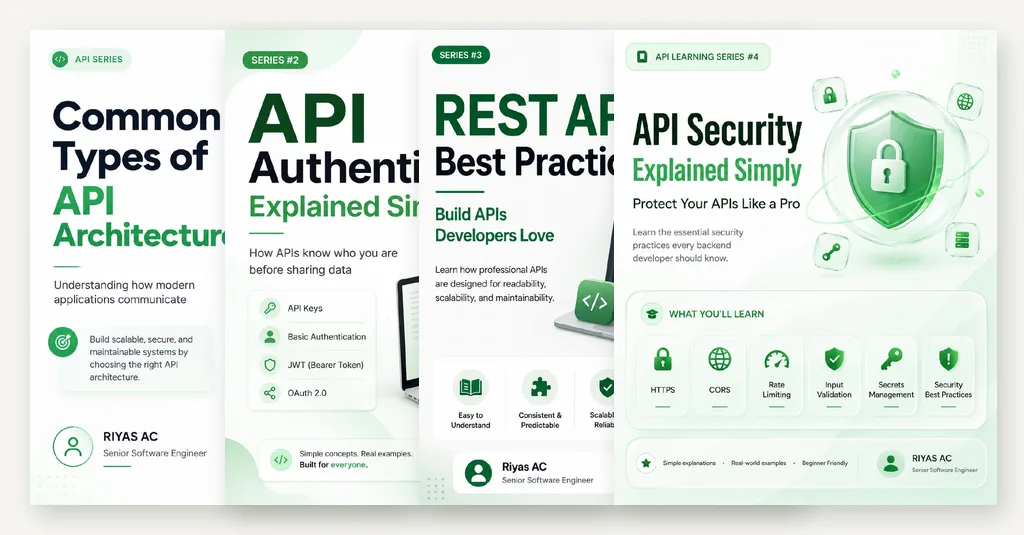
Building an API that works is the easy part. Building one that other developers can understand, that scales, and that does not leak data is where the real engineering happens. This guide covers the four areas that decide whether an API is good:
- Architecture: how systems exchange data (REST, GraphQL, SOAP, gRPC, WebSocket, event-driven)
- Authentication: how an API knows who is calling (API keys, Basic Auth, JWT, OAuth 2.0)
- REST design: URLs, HTTP methods, status codes, pagination, errors and versioning
- Security: HTTPS, CORS, rate limiting, input validation and secrets
Each section stands on its own, so skip to whatever you need. If you are preparing for backend interviews, read it top to bottom.
What Is API Architecture?
API architecture defines how applications exchange data and how the API itself is designed and organised. Think of it as the blueprint for communication between software systems.
The choice affects more than syntax. It decides:
- How well the system scales
- How fast clients get their data
- How easy the API is to maintain and change
- How pleasant it is for other developers to use
There are six architectures you will meet in practice. Each solves a different problem.
The Six Common API Architectures
1. REST (Representational State Transfer)
REST is the most widely used API style. It treats everything as a resource with its own URL, and uses standard HTTP methods to act on it.
Key characteristics:
- HTTP methods describe the action:
GET,POST,PUT,PATCH,DELETE - Resource-based URLs such as
/users/15or/products/120 - Stateless: each request carries everything the server needs; the server keeps no client session between requests
- JSON responses in most modern APIs, which are light and easy to parse
GET /users/15 HTTP/1.1
Host: api.example.com
{
"id": 15,
"name": "Riyas"
}Best for: web applications, mobile apps, public APIs and CRUD operations.
2. GraphQL
GraphQL was built to fix two problems REST clients run into:
- Over-fetching: the endpoint returns more data than the screen needs
- Under-fetching: the screen needs data from
/users,/ordersand/products, so the client makes three requests
GraphQL exposes a single endpoint, usually /graphql. The client describes exactly the shape of data it wants, and the server returns that shape and nothing more.
{
  user(id: 15) {
    id
    name
    email
    orders {
      id
      total
    }
  }
}
{
"data": {
"user": {
"id": 15,
"name": "Riyas",
"email": "riyas@example.com",
"orders": [
{ "id": 101, "total": 2500 }
]
}
}
}One request replaced what would have been two or three REST calls. The schema is typed and self-documenting, which gives GraphQL excellent tooling.
Best for: complex frontends, mobile apps on slow networks, and gateways that aggregate several backend services.
Watch out for: HTTP caching is harder because everything goes through one URL with POST, and a careless query can ask for a huge nested graph. Limit query depth and cost on the server.
3. SOAP (Simple Object Access Protocol)
SOAP is an XML-based protocol with a formal, strict specification. It predates REST and is still common in banking, healthcare, government and telecom systems.
<soap:Envelope xmlns:soap="http://schemas.xmlsoap.org/soap/envelope/">
  <soap:Header>
    <AuthToken>abc123</AuthToken>
  </soap:Header>
  <soap:Body>
    <GetUserRequest>
      <UserID>15</UserID>
    </GetUserRequest>
  </soap:Body>
</soap:Envelope>
What it offers:
- Strict contracts defined in a WSDL file, so both sides agree on every field and type
- WS-Security for message-level signing and encryption
- Extensions for reliable messaging and distributed transactions (WS-ReliableMessaging, WS-AtomicTransaction)
The cost is verbosity. XML envelopes are heavy, tooling is older, and development is slower than with REST.
Best for: enterprise and regulated systems where formal contracts, security and compliance matter more than speed of development. Most new public APIs no longer choose SOAP, but you will integrate with it.
4. gRPC
gRPC is a high-performance RPC framework created by Google. Instead of JSON, it serialises data with Protocol Buffers (Protobuf), a compact binary format, and runs over HTTP/2.
You define the contract first in a .proto file, then generate client and server code for your language:
syntax = "proto3";

service UserService {
  rpc GetUser (UserRequest) returns (UserResponse);
  rpc CreateUser (CreateUserRequest) returns (UserResponse);
}

message UserRequest {
  int32 id = 1;
}

message UserResponse {
  int32 id = 1;
  string name = 2;
  string email = 3;
}
Why teams pick it:
- Fast: binary payloads are smaller and quicker to parse than JSON
- Strong typing: the
.protofile is the single source of truth - Streaming: client, server and bi-directional streams are built in
Best for: service-to-service calls inside a microservice system, high-throughput internal APIs and real-time pipelines.
Watch out for: browsers cannot call gRPC directly. You need gRPC-Web and a proxy, which is why most teams keep gRPC internal and put REST or GraphQL in front of web clients.
5. WebSocket
REST follows request and response: the client asks, the server answers, done. A WebSocket opens a persistent, two-way connection. Once it is open, either side can send a message at any time.
Client                                  Server
  │  1. HTTP request with Upgrade header  │
  │ ────────────────────────────────────▶ │
  │      101 Switching Protocols          │
  │ ◀──────────────────────────────────── │
  │                                       │
  │  2. Connection stays open             │
  │ ◀──────── messages both ways ───────▶ │
  │                                       │
  │  3. Either side closes                │
const socket = new WebSocket("wss://example.com/socket");

socket.onopen = () => console.log("Connection opened");
socket.onmessage = (event) => console.log("Message:", event.data);
socket.onclose = () => console.log("Connection closed");| WebSocket | REST |
|---|---|
| Real-time, both directions | Client asks, server answers |
| One long-lived connection | Independent requests |
| Server can push instantly | Client must poll for updates |
| Best for live updates | Best for standard CRUD |
Best for: chat, live dashboards, multiplayer games, stock tickers and live notifications.
Watch out for: long-lived connections are stateful. Load balancing, reconnection and scaling across many servers all need more thought than stateless REST.
6. Event-Driven APIs
In an event-driven system, services do not call each other directly. A service publishes an event when something happens, and any interested service reacts to it.
Take an e-commerce order:
- The customer places an order. The order service publishes
OrderCreated. - The payment service charges the card and publishes
PaymentSucceeded. - The inventory service hears it and reduces stock.
- The email service hears it and sends a confirmation.
- The shipping service hears it and starts delivery.
The order service knows nothing about email or shipping. You can add a new consumer, say a loyalty-points service, without touching any existing code.
{
  "event": "OrderCreated",
  "event_id": "evt_9867ab",
  "timestamp": "2026-10-07T10:30:45Z",
  "data": {
    "order_id": 10123,
    "customer_id": 501,
    "total": 2500.00,
    "currency": "INR"
  },
  "source": "order-service"
}
Events travel through a message broker such as Kafka, RabbitMQ or AWS EventBridge.
- Loose coupling between services
- Scale by adding more consumers
- Asynchronous work keeps user-facing requests fast
- Events can be retried or replayed after a failure
Watch out for: more moving parts, harder debugging across services, and eventual consistency. The email might go out a second after the order is saved, not at the same instant.
Which Architecture Should You Choose?
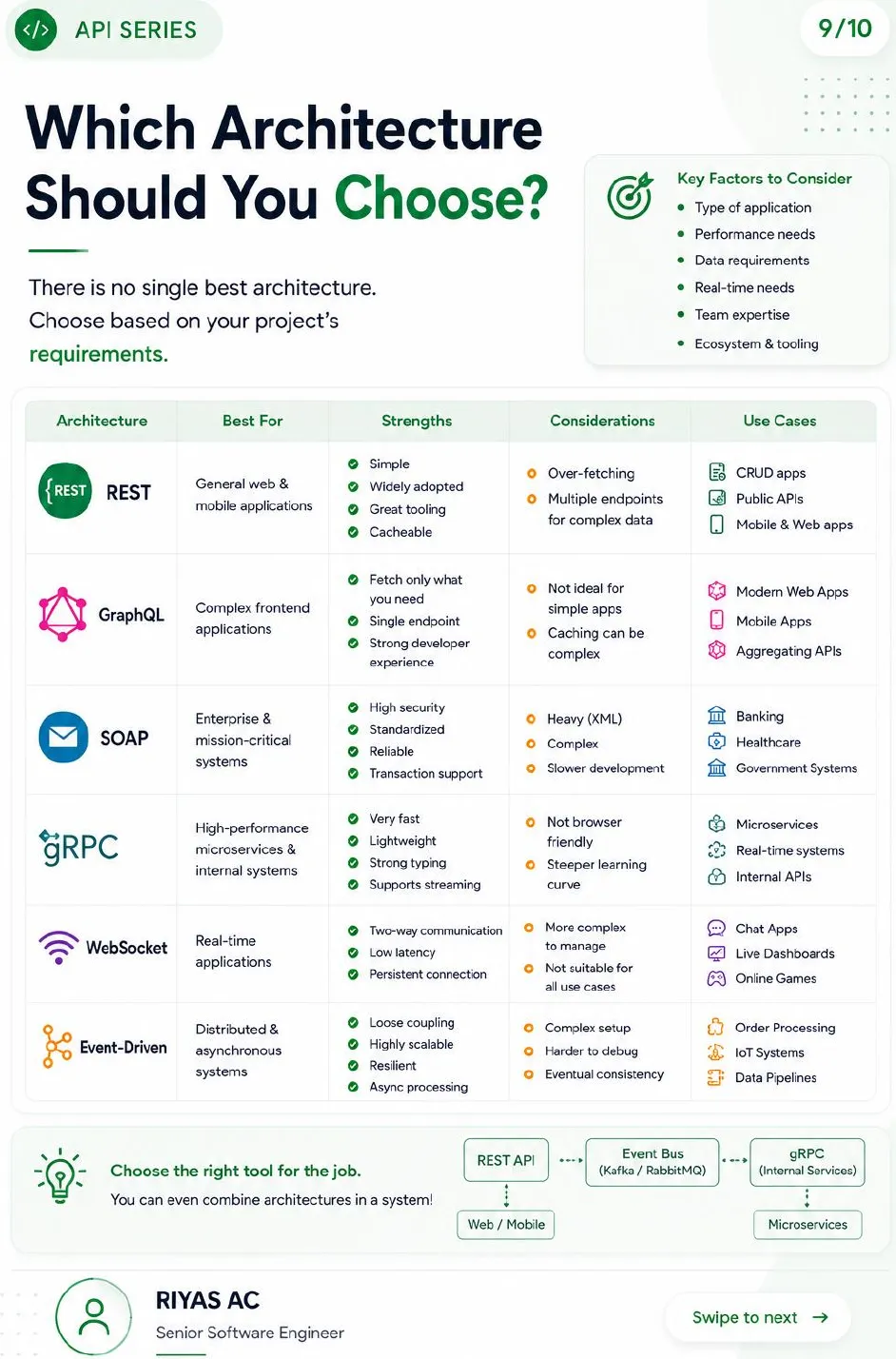
There is no single best architecture. Pick based on the type of application, performance needs, data shape, real-time requirements, and what your team already knows.
| Architecture | Best for | Strengths | Trade-offs |
|---|---|---|---|
| REST | General web and mobile apps, public APIs | Simple, widely adopted, cacheable, great tooling | Over-fetching; many calls for complex screens |
| GraphQL | Complex frontends, API aggregation | Fetch exactly what you need; one endpoint; typed schema | Caching is harder; overkill for simple apps |
| SOAP | Enterprise and regulated systems | Strict contracts, WS-Security, transaction support | Heavy XML; slower development |
| gRPC | Internal microservices | Very fast, compact, strongly typed, streaming | Not browser-friendly; steeper learning curve |
| WebSocket | Real-time apps | Two-way, low latency, persistent | Stateful connections are harder to scale |
| Event-driven | Distributed, asynchronous systems | Loose coupling, scalable, resilient | Complex setup; harder to debug; eventual consistency |
Real systems mix them. A common setup is REST or GraphQL for web and mobile clients, gRPC between internal services, and an event bus for anything that can happen in the background.
Web / Mobile ──▶ REST API ──▶ Event Bus (Kafka / RabbitMQ) ──▶ Microservices
                                                                  │
                                                         gRPC between services
Authentication vs Authorization
Walk into a bank and say “show me my account balance.” The teller will not answer until they have checked your ID. APIs work the same way. Before sharing data, they ask: who are you?
Two separate questions get mixed up all the time:
| Authentication | Authorization | |
|---|---|---|
| Question | Who are you? | What are you allowed to do? |
| Checks | Identity | Permissions |
| Example | Logging into Gmail with your password | A manager can view salaries; an intern cannot |
| Failure status | 401 Unauthorized | 403 Forbidden |
Authentication always comes first. You cannot decide what someone may do until you know who they are.
Four Common Authentication Methods
1. API Key
An API key works like a movie ticket. Show a valid ticket and you get in. No ticket, no entry.
The client sends a unique key with every request, usually in a header:
GET /weather HTTP/1.1
Host: api.weatherapp.com
x-api-key: abc123xyz
The server looks up the key and allows the request if it is valid.
- Easy to generate and use
- Works well for server-to-server calls and simple public APIs
- Light and fast
- Identifies an application, not a user
- Anyone who sees the key can use it until you revoke it
- Not suitable on its own for sensitive data
Never put an API key in frontend code or a URL query string. Browsers, logs and proxies all record URLs.
2. Basic Authentication
The client sends a username and password with every request. They are joined with a colon and Base64-encoded into the Authorization header:
GET /users/15 HTTP/1.1
Host: api.example.com
Authorization: Basic cml5YXM6cGFzc3dvcmQ=
That header decodes to riyas:password. Base64 is encoding, not encryption. Anyone who intercepts the request can read the password, so Basic Auth is only acceptable over HTTPS.
- Very easy to implement
- Supported by almost every tool and HTTP client
- Fine for internal tools and low-risk systems
- Real credentials travel with every request
- No expiry; a leaked password works until it is changed
- Not recommended for public APIs or sensitive data
3. Bearer Token (JWT)
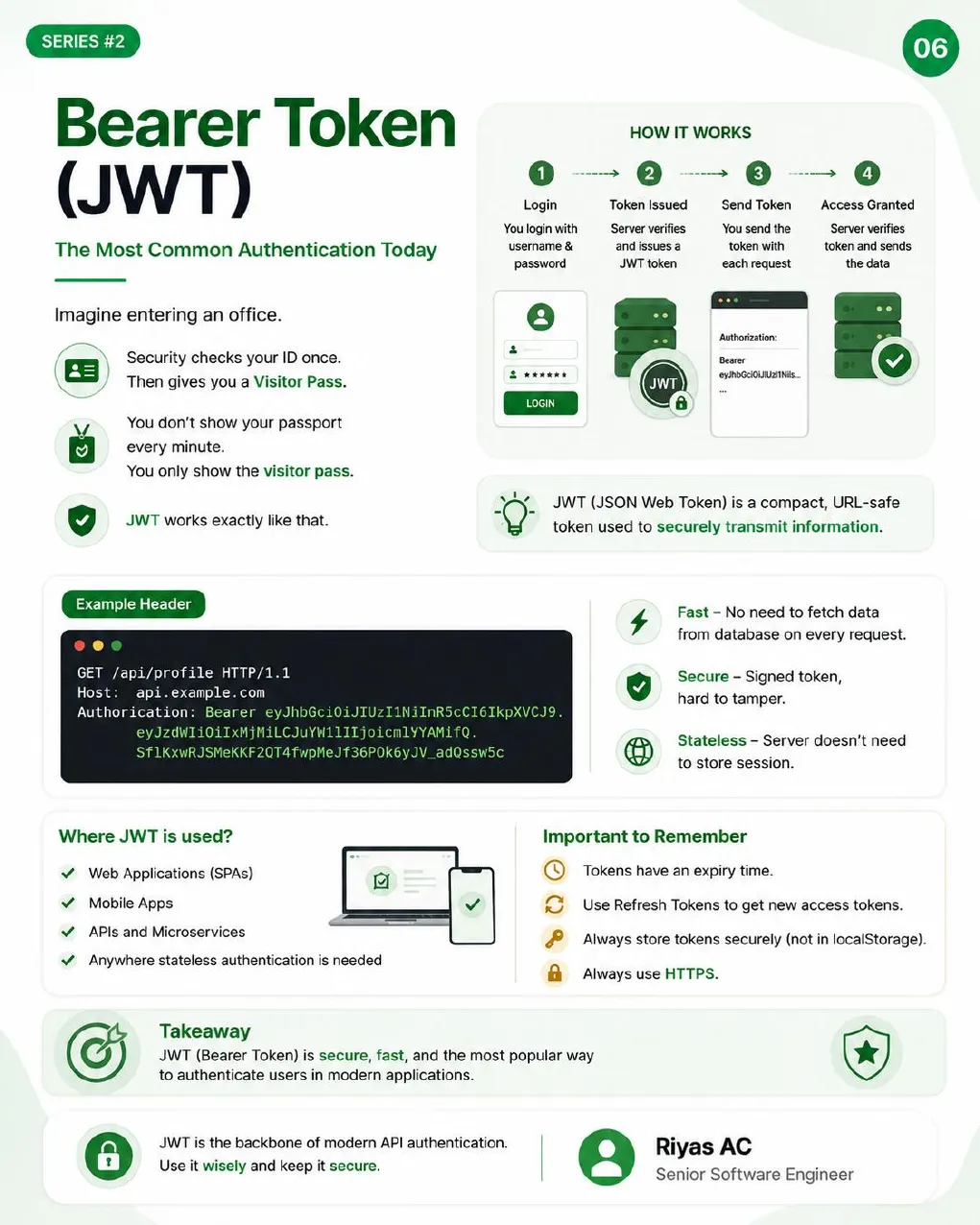
Think of entering an office building. Security checks your ID once and hands you a visitor pass. For the rest of the day you show the pass, not your passport.
JWT (JSON Web Token) works the same way:
- Login: the client sends a username and password once.
- Token issued: the server verifies them and returns a signed JWT.
- Send token: the client includes the token on every request.
- Access granted: the server checks the signature and serves the data.
GET /api/profile HTTP/1.1
Host: api.example.com
Authorization: Bearer eyJhbGciOiJIUzI1NiIsInR5cCI6IkpXVCJ9.eyJzdWIiOiIxMjM0NTY3ODkwIn0.SflKxwRJSMeKKF2QT4fwpMeJf36POk6yJV_adQssw5c
A JWT has three parts separated by dots: a header, a payload of claims (user ID, roles, expiry), and a signature. Because the signature proves the token has not been altered, the server can trust the claims without a database lookup.
- Stateless: no server-side session store
- Fast: no database hit to identify the user on each request
- Tamper-evident: changing any claim breaks the signature
Rules that keep JWTs safe:
- The payload is signed, not encrypted. Anyone can decode it, so never put secrets in it.
- Keep access tokens short-lived (minutes, not days) and use refresh tokens to get new ones.
- Revoking a JWT before expiry needs extra work, such as a deny-list. Short expiry limits the damage.
- Store tokens in HttpOnly cookies or secure platform storage, not
localStorage, where any injected script can read them. - Always use HTTPS.
4. OAuth 2.0
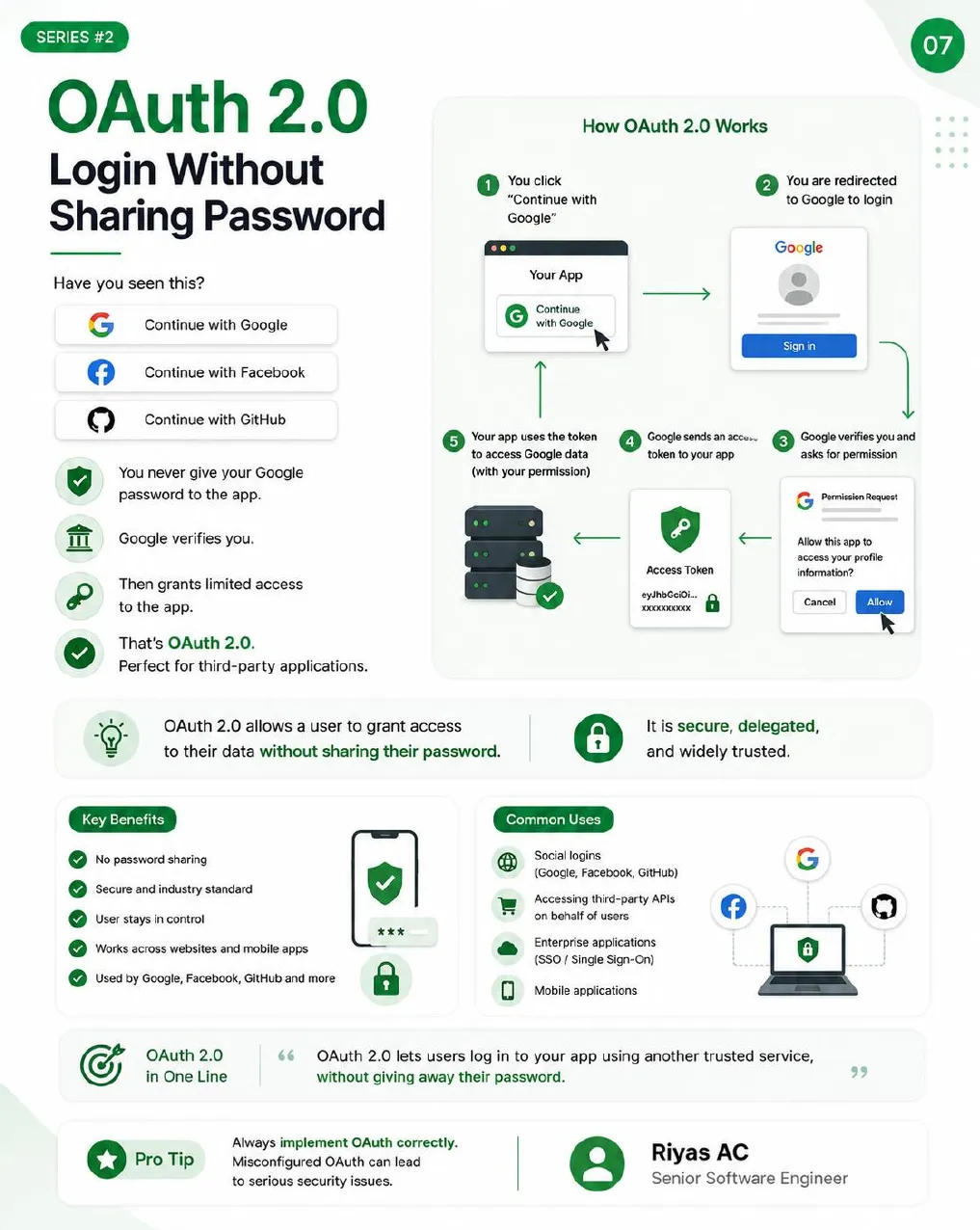
You have seen “Continue with Google”, “Continue with GitHub” and “Continue with Facebook.” That is OAuth 2.0.
- You click “Continue with Google” in an app.
- The app redirects you to Google to sign in.
- Google verifies you and asks whether to grant the app access to your profile.
- Google sends the app an access token.
- The app uses that token to call Google’s APIs on your behalf.
The app never sees your Google password. It only gets a token with the limited access you approved, and you can revoke it later.
Strictly, OAuth 2.0 is an authorization framework: it grants access to data. The “sign in with” part is handled by OpenID Connect, a thin identity layer on top of OAuth 2.0. In practice the two arrive together.
Common uses: social login, apps that call third-party APIs for a user, enterprise single sign-on, and mobile apps.
OAuth is easy to get subtly wrong. Use a well-maintained library, validate the state parameter, use PKCE for mobile and single-page apps, and register exact redirect URIs.
Which Authentication Should You Use?
| Method | Best for | How it works | Security | Ease of use |
|---|---|---|---|---|
| API key | Server-to-server, simple public APIs | Client sends a unique key on each request | Medium | Very easy |
| Basic Auth | Internal tools, low-risk apps | Base64 username and password on each request | Low | Easy |
| JWT | Web and mobile apps, SPAs, microservices | Signed token verified without a session store | High | Moderate |
| OAuth 2.0 | Third-party login, delegated access | User signs in with a provider; app gets a scoped token | Very high | Moderate |
Ask these questions before choosing:
- Who is calling the API: internal services, the public, or third-party users?
- How sensitive is the data?
- Where is it consumed: web, mobile or server-to-server?
- Do you need the identity of a user, or only of an application?
Then pick the simplest method that keeps the data safe. Methods also combine well. A common pattern is OAuth 2.0 for login, after which your own backend issues a short-lived JWT for API access.
Common Authentication Mistakes
- Secrets in frontend code. Anyone can open dev tools and read them.
- No HTTPS. Credentials over HTTP are a password written on a postcard.
- Keys in public repos or docs. Bots scan GitHub for leaked keys within minutes.
- Tokens that never expire. A stolen token stays useful forever.
- Tokens in
localStorage. One XSS bug exposes every session. - Skipping input validation. Authentication does not make input safe.
- Over-permissive tokens. Grant only the scopes the client needs.
Anatomy of a Request and Response
Every API call is a conversation. The client sends a request; the server processes it and sends a response.
GET /api/users/15 HTTP/1.1
Host: api.example.com
Authorization: Bearer eyJhbGciOiJIUzI1NiIs...
Accept: application/json
HTTP/1.1 200 OK
Content-Type: application/json
{
"id": 15,
"name": "Riyas AC",
"email": "riyas@example.com",
"role": "Developer",
"status": "Active"
}| Request part | Purpose | Response part | Purpose |
|---|---|---|---|
| Method | The action (GET, POST, ...) | Status code | Whether it worked (200, 404, 500) |
| URL | The resource | Headers | Metadata (Content-Type, Cache-Control) |
| Headers | Metadata (Authorization, Content-Type) | Body | The returned data, usually JSON |
| Body | Data sent with POST, PUT, PATCH |
REST API Design Best Practices
Picture two apps. One is clear and predictable. The other has a different naming style on every screen. Developers feel the same difference between a well-designed API and a careless one. A good API is easy to understand, consistent, predictable, well documented and easy to maintain. That does not happen by chance.
Use Nouns, Not Verbs
URLs name resources. HTTP methods name actions. Do not put the action in the URL.
| Avoid | Use |
|---|---|
GET /getUsers | GET /users |
POST /createUser | POST /users |
POST /updateUser | PUT /users/15 or PATCH /users/15 |
POST /deleteUser | DELETE /users/15 |
Keep URLs Consistent
- Lowercase letters
- Plural nouns:
/users,/orders,/products - Hyphens between words, not underscores:
/order-items - Short paths; nest only for real ownership, such as
/users/15/orders - The same pattern everywhere in the API
/get_user,/userList,/ProductData,/allProductsList,/Create-New-User
Use the Right HTTP Method
| Method | CRUD | Example | Idempotent | Safe |
|---|---|---|---|---|
GET | Read | GET /users/15 | Yes | Yes |
POST | Create | POST /users | No | No |
PUT | Replace | PUT /users/15 | Yes | No |
PATCH | Partial update | PATCH /users/15 | Depends | No |
DELETE | Delete | DELETE /users/15 | Yes | No |
- Safe means the request does not change server data.
- Idempotent means sending the same request many times has the same effect as sending it once. This matters for retries: a client can safely retry a timed-out
PUT, but retrying aPOSTmay create a duplicate. PATCHdepends on the payload.{"price": 499}is idempotent;{"stock": "+1"}is not.
Do not use POST for everything. The method tells clients, caches and proxies how to treat the request.
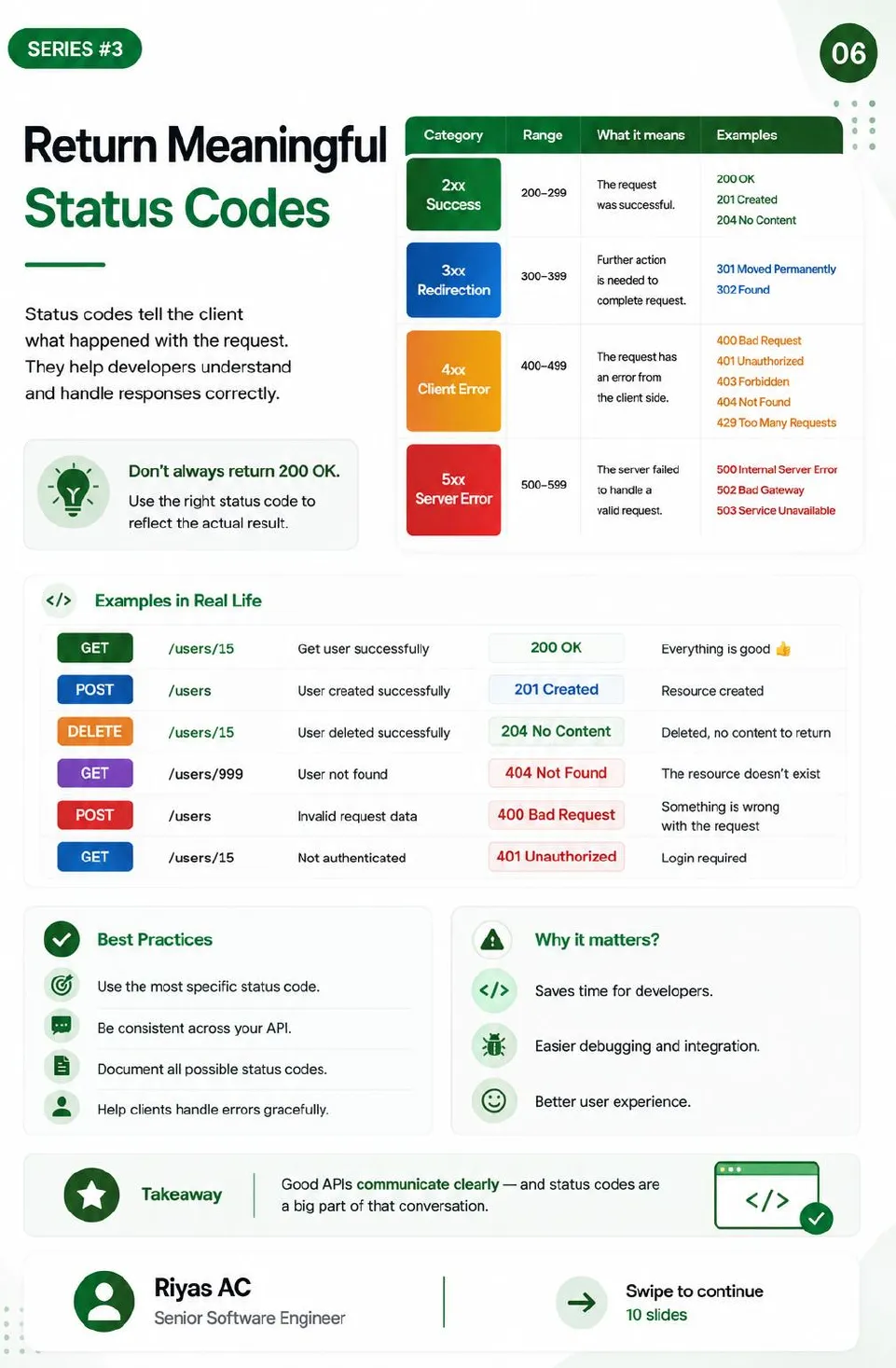
Return Meaningful Status Codes
Do not return 200 OK with {"error": "not found"} in the body. The status code is the first thing a client checks.
| Range | Meaning | Common codes |
|---|---|---|
| 2xx | Success | 200 OK, 201 Created, 204 No Content |
| 3xx | Redirection | 301 Moved Permanently, 304 Not Modified |
| 4xx | Client error | 400 Bad Request, 401 Unauthorized, 403 Forbidden, 404 Not Found, 429 Too Many Requests |
| 5xx | Server error | 500 Internal Server Error, 502 Bad Gateway, 503 Service Unavailable |
In practice:
| Request | Situation | Status |
|---|---|---|
GET /users/15 | User found | 200 OK |
POST /users | User created | 201 Created |
DELETE /users/15 | Deleted, nothing to return | 204 No Content |
GET /users/999 | No such user | 404 Not Found |
POST /users | Invalid data | 400 Bad Request |
GET /users/15 | No valid credentials | 401 Unauthorized |
Use the most specific code that fits, use it the same way across the API, and document every code an endpoint can return.
Support Filtering and Pagination
A /products endpoint backed by 10,000 rows should never return all of them. Let the client ask for what it needs through query parameters:
| Parameter | Purpose | Example |
|---|---|---|
page | Which page | ?page=2 |
limit | Items per page | ?limit=20 |
| filter field | Narrow results | ?category=books |
sort | Sort field | ?sort=price |
order | Direction | ?order=desc |
GET /products?page=1&limit=10
GET /products?category=electronics
GET /products?sort=price&order=desc
GET /products?category=books&sort=name
Return the data with pagination metadata and navigation links, so clients do not have to build URLs themselves:
{
  "data": [
    { "id": 1, "name": "Product 1", "price": 120 },
    { "id": 2, "name": "Product 2", "price": 150 }
  ],
  "meta": {
    "page": 1,
    "limit": 2,
    "total": 45,
    "total_pages": 23
  },
  "links": {
    "next": "/products?page=2&limit=2",
    "prev": null
  }
}- Set a sensible default limit (10 or 20) when the client sends none
- Enforce a maximum limit so
?limit=100000cannot load the whole table - For large or fast-changing data, prefer cursor pagination (
?after=evt_9867ab) over page numbers; offsets get slow and skip rows when data shifts
Make Error Messages Helpful
This tells the developer nothing:
{ "error": "Something went wrong" }This tells them what failed, which field, and how to fix it:
{
  "status": 400,
  "error": "Validation Failed",
  "code": "VALIDATION_ERROR",
  "message": "One or more fields are invalid.",
  "details": [
    { "field": "email", "issue": "Invalid email format" },
    { "field": "password", "issue": "Password is too short" }
  ],
  "timestamp": "2026-10-07T10:30:45Z"
}| Field | Purpose |
|---|---|
status | The HTTP status code, repeated for convenience |
error | Short summary |
code | Machine-readable code clients can branch on |
message | Human-readable explanation |
details | Field-level problems |
timestamp | When it happened, for matching against logs |
- Use one error format across the whole API
- Make messages specific and actionable
- Log stack traces and internals on the server, never in the response
- Never expose sensitive data, such as whether an email exists on a login form
Version Your APIs
APIs change. Versioning lets you improve them without breaking clients that already depend on the old behaviour.
GET /api/v1/users  →  { id, name, email }
GET /api/v2/users  →  { id, name, email, phone, created_at }
Version 1 keeps working while new clients move to version 2. Never change the behaviour of a published version; release a new one.
| Strategy | Example | Pros | Cons |
|---|---|---|---|
| URI path | /api/v1/users | Clear, widely adopted, easy to test | Longer URLs |
| Query parameter | /api/users?version=1 | Simple to add | Easy for clients to forget |
| Header | API-Version: 1 | Clean URLs | Harder to test in a browser |
Create a new version when you:
- Remove or rename a field
- Change a field’s type or meaning
- Change business logic in a way clients can see
- Make a security change that old clients cannot follow
Adding a new optional field is not a breaking change and does not need a new version.
When you do release one: document each version, publish a migration guide, announce deprecation dates, and keep the old version running long enough for clients to move.
API Security Essentials
Every API on the internet is a target. Without proper security, attackers can steal data, take over user accounts, abuse your endpoints, overload your servers and take your application down. A working API is good. A secure one is the only kind worth shipping.
Always Use HTTPS
HTTP sends data as plain text that anyone on the network path can read or modify. HTTPS encrypts traffic between client and server with TLS.
- Serve every endpoint over HTTPS, including internal ones where possible
- Redirect or reject plain HTTP
- Send the
Strict-Transport-Securityheader so browsers never downgrade
Configure CORS Carefully
CORS (Cross-Origin Resource Sharing) controls which websites may call your API from a browser.
Allowed:      Access-Control-Allow-Origin: https://yourapp.com
Avoid:        Access-Control-Allow-Origin: *
- Allow only the domains you trust
- Never use
*for APIs that handle sensitive data or cookies - Review the allowed list whenever frontends change
One common misunderstanding: CORS is enforced by browsers. It does not stop curl, a script, or another server from calling your API. It protects your users’ browsers from malicious sites; authentication protects your API.
Apply Rate Limiting
Without limits, one user or bot can send thousands of requests a second. Rate limiting caps how many requests a client can make in a time window. Typical limits:
- 100 requests per minute per user
- 1,000 requests per hour per API key
- 10 login attempts per minute per IP or account
When a client goes over, return 429 Too Many Requests with a Retry-After header so well-behaved clients know when to try again.
HTTP/1.1 429 Too Many Requests
Retry-After: 30
Rate limiting prevents abuse, slows brute-force attacks, reduces server load, and keeps the API available for everyone. API gateways such as Nginx, Kong or AWS API Gateway can enforce it before requests reach your code.
Validate Every Input
Never trust client input. Validate and sanitise it on the server, even if the frontend already did. Frontend validation is for user experience; anyone can bypass it with a direct HTTP call.
{
  "email": "user@@example",
  "id": "abc123",
  "amount": "-1000",
  "role": "admin"
}
Every field above should be rejected. The email is malformed, the ID has the wrong type, the amount is negative, and role should never be accepted from the client at all.
Validate emails, phone numbers, IDs, query parameters, request bodies, dates and formats. Use parameterised queries or your ORM so input can never become part of a SQL or NoSQL query. Validation blocks injection attacks, keeps bad data out of the database, and stops malformed input from crashing your application.
Protect Your Secrets
Secrets include API keys, database passwords, tokens and private keys. If one leaks, attackers get into your systems.
# Bad: hardcoded in source
SECRET_KEY = "my-secret-key"
DB_PASSWORD = "password123"

# Better: read from the environment
import os

SECRET_KEY = os.getenv("SECRET_KEY")
DB_PASSWORD = os.getenv("DB_PASSWORD")
Where to keep secrets:
- Environment variables for most applications
- Secret managers such as AWS Secrets Manager or HashiCorp Vault
- CI/CD secret stores for pipelines
- Key management services such as AWS KMS or GCP KMS for encryption keys
Never commit secrets to Git. Keep local values in a .env file and add it to .gitignore. If a secret does reach a repository, rotate it immediately; deleting the commit is not enough.
Common API Security Mistakes
- Exposing API keys in code, URLs or client-side apps
- Weak or missing authentication on endpoints assumed to be “internal”
- Missing authorization checks. Verify the user may access this record, not only that they are logged in. Changing
/orders/101to/orders/102must not show someone else’s order. - Returning sensitive data such as password hashes, tokens or internal fields the client does not need
- Disabling HTTPS, even “just for testing”
- Trusting client input instead of validating on the server
- Overly permissive CORS with
* - No rate limiting, which invites abuse, overload and downtime
Small mistakes today become large breaches later. Missing authorization checks in particular are behind many real API incidents; the OWASP API Security Top 10 lists broken object-level authorization first.
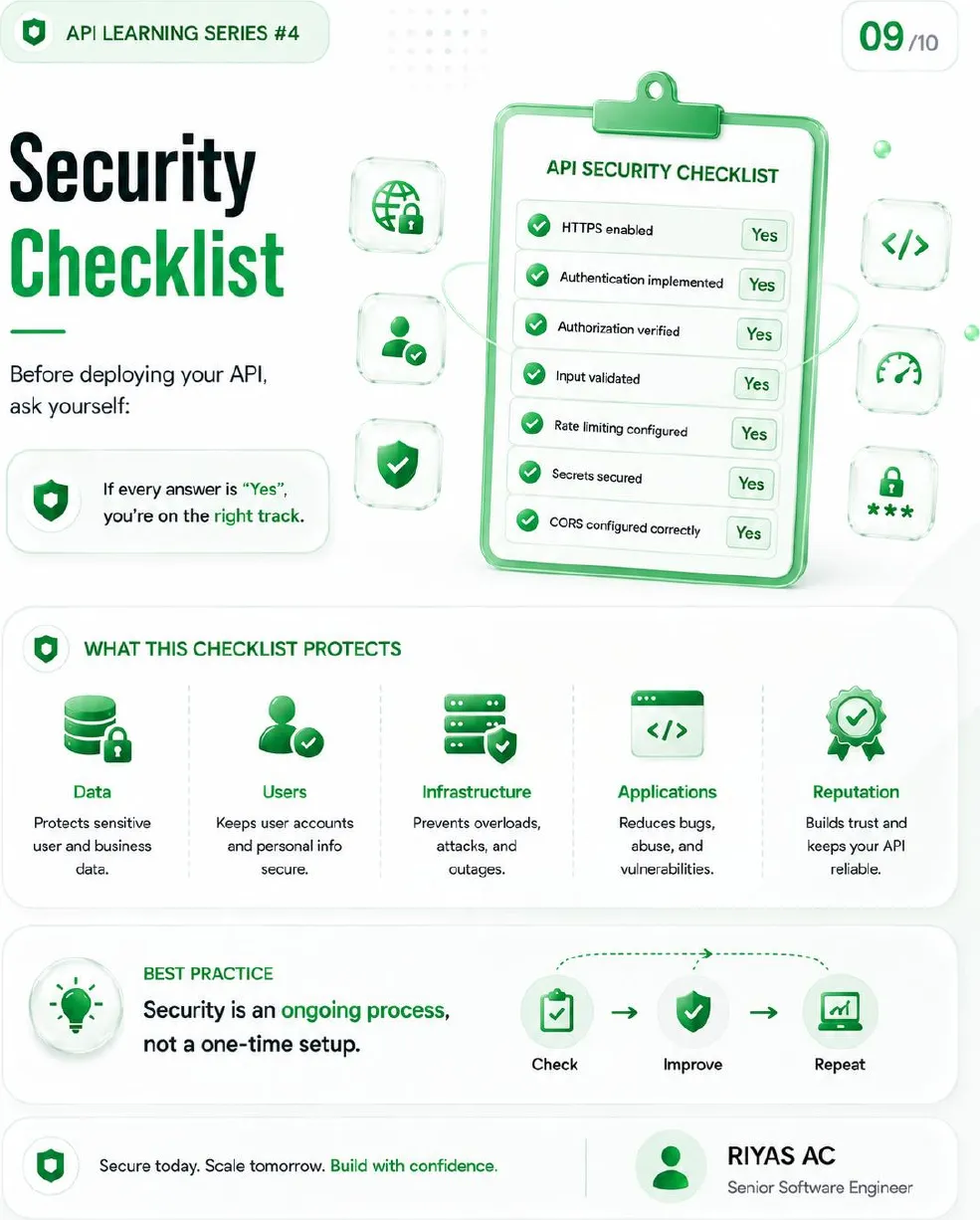
Security Checklist Before You Deploy
Answer each of these before an API goes live:
- HTTPS enabled
- Authentication implemented
- Authorization verified on every endpoint and every record
- Input validated on the server
- Rate limiting configured
- Secrets stored outside the code
- CORS restricted to trusted origins
- Tokens short-lived, with refresh tokens
- Logging and monitoring for suspicious activity
- Dependencies up to date
If every answer is yes, you are on the right track. Security is not a one-time setup: check, improve, repeat.
Conclusion
A good API comes down to four decisions made well:
- Architecture: REST by default; GraphQL, gRPC, WebSocket or events when the problem calls for them. Combining them is normal.
- Authentication: the simplest method that protects the data. API keys for services, JWT for your own apps, OAuth 2.0 for third-party access.
- Design: nouns in URLs, the right HTTP method, honest status codes, pagination, useful errors and versioning.
- Security: HTTPS, strict CORS, rate limits, server-side validation, protected secrets and authorization on every record.