AWS Basics for Beginners: Essential Services Explained with Examples
What cloud computing is, the essential AWS services with simple examples, how they fit together in real architectures, and which ones to learn first.
Introduction
Cloud computing means renting computers, storage and databases over the internet instead of buying your own. You pay for what you use.
Amazon Web Services (AWS) is Amazon's cloud platform, with hundreds of services. Companies use it to launch faster, scale when traffic grows, and avoid running data centres. You pick a service and a location, and AWS runs the hardware; you control it through the web console, the command line or code.
For example, an online store keeps product images in Amazon S3, runs its site on Amazon EC2 and stores orders in Amazon RDS. During a sale it adds servers for a few hours, then removes them.
This guide covers AWS basics for beginners: the essential services, how they fit together, key concepts, and what to learn first. Most applications use only a handful of services.
Essential AWS Services
Each table gives a short definition, an everyday comparison and a developer use case.
Compute
| Service | What it is | Real-world example | Developer use case |
|---|---|---|---|
| Amazon EC2 | Virtual servers. You choose the OS, CPU and memory. | Renting a computer instead of buying one | Run a Django or FastAPI app on Linux |
| AWS Lambda | Runs a function when an event happens, with no servers to manage. Billed per request and run time. | A light that turns on only when someone enters | Resize each image uploaded to S3 |
| Amazon ECS | AWS's service for running Docker containers, on EC2 or serverless Fargate. | A port scheduling containers onto ships | Run a containerized API |
| Amazon EKS | Managed Kubernetes. AWS runs the control plane. | The same port, using an industry-standard system | Teams already using Kubernetes |
| AWS Elastic Beanstalk | Upload code; it sets up servers, load balancing and scaling. | Renting a furnished flat | Deploy a Python web app quickly |
ECS or EKS? Both run containers. ECS is simpler and AWS-specific; EKS is Kubernetes, with more to learn. Beginners should start with ECS, Elastic Beanstalk or Lambda.
Storage
| Service | What it is | Real-world example | Developer use case |
|---|---|---|---|
| Amazon S3 | Object storage: files ("objects") kept in buckets. | A labelled storage unit with no size limit | User uploads, backups, static websites |
| Amazon EBS | A virtual disk attached to an EC2 instance. | The SSD in your laptop | The server's OS and app disk |
| Amazon EFS | A file system many servers share at once. | An office network drive | Several servers reading one media folder |
S3, EBS or EFS? S3 stores files accessed through an API. EBS is one server's disk. EFS is a folder shared by many servers.
Databases
| Service | What it is | Real-world example | Developer use case |
|---|---|---|---|
| Amazon RDS | Managed SQL databases such as PostgreSQL and MySQL. AWS handles backups and patching. | Hiring someone to look after your filing cabinet | PostgreSQL for a Django app |
| Amazon DynamoDB | Serverless NoSQL key-value and document database, fast at any scale. | A huge, fast lookup table | Shopping carts, sessions, game scores |
| Amazon Aurora | AWS's MySQL- and PostgreSQL-compatible database, in the RDS family. | A stronger engine for the same car | A PostgreSQL app outgrowing standard RDS |
RDS or Aurora? Both are managed SQL databases. Aurora is built for higher performance and availability, and can cost more for small workloads. Start with standard RDS.
Networking and Content Delivery
| Service | What it is | Real-world example | Developer use case |
|---|---|---|---|
| Amazon VPC | Your private, isolated network in AWS. | A gated community | Keep the database off the public internet |
| Elastic Load Balancing (ELB) | Spreads traffic across servers or containers. | A host seating guests at many tables | Share traffic across three healthy servers |
| Amazon Route 53 | DNS and domain registration. | The internet's phone book | Point api.example.com at your app |
| Amazon CloudFront | A CDN that caches content close to users. | Local warehouses for faster delivery | Serve images and JavaScript quickly worldwide |
| Amazon API Gateway | Creates and secures APIs in front of your backend. | A reception desk checking visitors | A REST API in front of Lambda |
Security and Identity
| Service | What it is | Real-world example | Developer use case |
|---|---|---|---|
| AWS IAM | Controls who can access which resources. | Key cards that open certain doors | Let an app read one S3 bucket only |
| AWS Secrets Manager | Stores and rotates passwords and API keys. | A vault for passwords | Read the DB password at startup, not from code |
| AWS Key Management Service (KMS) | Creates and manages encryption keys. | The master key cabinet | Encrypt S3, EBS and RDS data |
Monitoring and Management
| Service | What it is | Real-world example | Developer use case |
|---|---|---|---|
| Amazon CloudWatch | Metrics, logs and alarms. | A car dashboard | Alert when errors spike |
| AWS CloudTrail | Records who did what in your account, and when. | Security camera footage | Find who deleted a bucket |
| AWS CloudFormation | Infrastructure as code: YAML or JSON templates that create resources. | An architect's blueprint | Identical staging and production |
CloudWatch or CloudTrail? CloudWatch watches how resources behave; CloudTrail records what people and services did.
Messaging and Integration
| Service | What it is | Real-world example | Developer use case |
|---|---|---|---|
| Amazon SQS | A queue holding tasks until a worker takes them. | A bakery ticket queue | Queue welcome emails so signup stays fast |
| Amazon SNS | Publish-subscribe: one message to many subscribers, including email and SMS. | A group announcement | Tell several services about a new order |
| Amazon EventBridge | Routes events between services by rules, and runs schedules. | A switchboard | Run a nightly cleanup job |
SQS or SNS? SQS: each message is processed by one worker. SNS: one message goes to many subscribers.
Developer and Deployment Tools
| Service | What it is | Real-world example | Developer use case |
|---|---|---|---|
| AWS CodeBuild | Runs builds and tests, and creates artifacts like Docker images. | A test kitchen | Run pytest on every push |
| AWS CodeDeploy | Automates deployments to EC2, Lambda and ECS. | A delivery team with a checklist | Gradual rollouts with automatic rollback |
| AWS CodePipeline | Chains source, build, test and deploy steps. | An assembly line | Push to GitHub, then build and deploy automatically |
Practical Examples
Example 1: Hosting a website
User → Route 53 (DNS) → CloudFront (CDN) → S3 (static files)
                                          → EC2 (dynamic pages)
Route 53 points your domain at CloudFront, which serves cached files from S3 and forwards dynamic requests to EC2. A purely static site needs only S3 and CloudFront.
Example 2: Deploying a Django or FastAPI application
User → Load balancer → EC2 or Elastic Beanstalk (Django/FastAPI)
                          ├── RDS for PostgreSQL (data)
                          └── S3 (user uploads)
- Run the app on EC2, or let Elastic Beanstalk manage the servers.
- Keep data in RDS for PostgreSQL in a private subnet, reachable only from the app.
- Save uploads to S3, not the server's disk, so they survive server replacement.
- Use an IAM role for S3 access and Secrets Manager for the database password.
Example 3: Building a serverless API
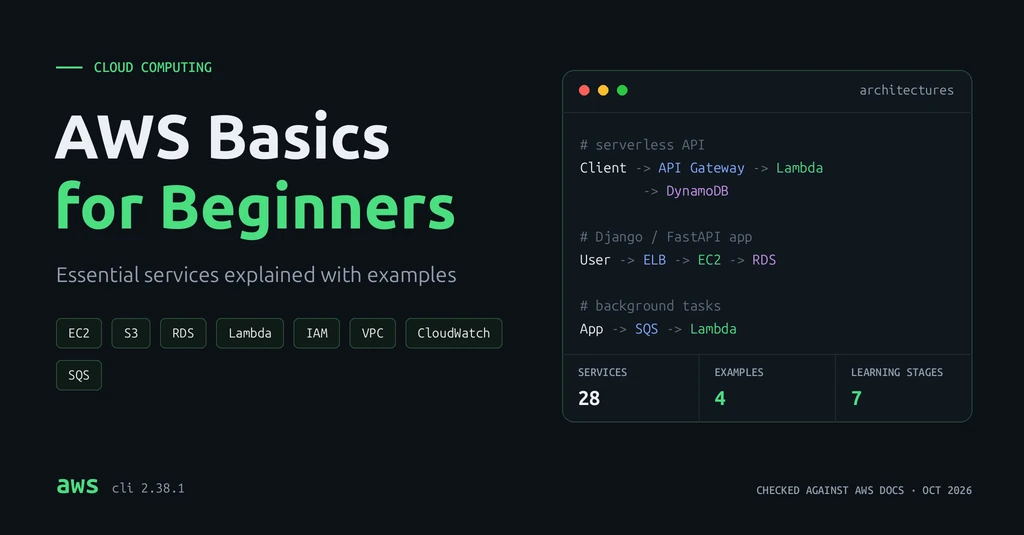
Client → API Gateway → Lambda → DynamoDB
API Gateway receives the request and calls Lambda, which reads or writes DynamoDB and returns JSON. No servers to manage, and costs follow traffic, which suits uneven workloads.
Example 4: Processing background tasks
Web app → SQS queue → Lambda (worker) → result saved or email sent
The app adds a message to SQS and responds immediately. Lambda picks it up and does the slow work. If processing fails, the message returns to the queue for a retry.
Important AWS Concepts
- Regions and Availability Zones: a Region is a geographic area, such as Mumbai or Ireland. It contains several Availability Zones (AZs): separate data centres with independent power and networking. Pick a Region near your users.
- Scalability and elasticity: scalability is handling more load; elasticity is adding and removing capacity automatically as load changes.
- High availability: running across at least two AZs, so one failing data centre does not take your app down.
- Pay-as-you-go pricing: prices depend on the service, usage, Region and configuration. Check pricing before you launch anything.
- Shared Responsibility Model: AWS secures the cloud itself (hardware, facilities, network). You secure what you put in it: data, permissions, network rules and code.
- IAM users, roles and policies: a user has long-term credentials. A role grants temporary permissions to whatever assumes it, such as an EC2 instance. A policy is a JSON document of allowed or denied actions.
- AWS Free Tier and charges: new accounts can start on a free plan with promotional credits, and some services have always-free monthly limits. These come with eligibility rules, time and usage limits, and not every service is included. On a paid plan, usage beyond your credits is billed. Terms change, so read the official Free Tier page.
Basic AWS Deployment Workflow
These are the usual steps for a backend app. Not every app needs every service.
- Create an AWS account, protect the root user with multi-factor authentication (MFA), and do not use it for daily work.
- Configure IAM permissions with least privilege.
- Choose a compute service: Elastic Beanstalk or EC2 for a traditional app, ECS for containers, Lambda for event-driven code.
- Configure networking: private subnets for databases, and security groups that open only the ports you need.
- Set up the database, if needed.
- Configure environment variables and secrets, never in code.
- Deploy the application, by hand first, then through a pipeline.
- Configure logging and monitoring with CloudWatch.
- Review costs and security settings.
AWS CLI Example
The AWS CLI controls AWS from your terminal. Install version 2 on Linux (x86_64):
curl "https://awscli.amazonaws.com/awscli-exe-linux-x86_64.zip" -o "awscliv2.zip"
unzip awscliv2.zip
sudo ./aws/install
aws --version
The installation guide covers macOS and Windows.
Sign in with short-term credentials instead of storing access keys. From AWS CLI 2.32.0, aws login uses your console sign-in in the browser and keeps temporary credentials refreshed for up to 12 hours:
aws login
aws s3 ls
aws s3 ls lists your S3 buckets, one per line with its creation date. Before you sign in, it fails safely (output from AWS CLI 2.38.1):
$ aws s3 ls
aws: [ERROR]: An error occurred (NoCredentials): Unable to locate credentials. You can configure credentials by running "aws login".
Organizations using IAM Identity Center use aws configure sso instead. Avoid long-term access keys, never hardcode or commit them, and use IAM roles for code running on AWS.
AWS Best Practices
- Least-privilege IAM permissions, with roles instead of long-term keys.
- No credentials or secrets in Git. Use Secrets Manager or environment variables.
- Monitoring and logging with CloudWatch, and CloudTrail left on.
- Encryption at rest (KMS) and in transit (HTTPS).
- Budgets and billing alerts in AWS Budgets, before you build anything.
- Unused resources removed: idle instances, old snapshots, unused load balancers.
- Managed services when they fit, such as RDS instead of PostgreSQL on EC2.
- Minimal network exposure: private databases, only the ports you need.
Common Beginner Mistakes
- Learning every service at once. Start with five or six.
- Excessive IAM permissions, such as
AdministratorAccessfor an app. - Leaving resources running. Many keep charging while idle.
- Public databases. An open database port invites attacks.
- Ignoring billing until a surprise bill arrives.
- Treating S3 as a filesystem. S3 stores whole objects through an API; you cannot mount and edit files in place.
- Complex infrastructure for a simple app. A small Django app does not need Kubernetes.
Recommended Learning Path
| Stage | Learn | Hands-on project |
|---|---|---|
| 1 | Cloud computing fundamentals | Explore the console; read the pricing page for EC2 and S3 |
| 2 | IAM and account security | Enable MFA on the root user, create a separate admin identity for daily work, and set a budget alert |
| 3 | EC2, S3 and VPC | Host a static site on S3; run a small app on EC2 |
| 4 | RDS and DynamoDB | Connect a Django or FastAPI app to RDS for PostgreSQL |
| 5 | Lambda and API Gateway | Build the serverless API from Example 3 |
| 6 | CloudWatch and deployment automation | Add alarms and a CodePipeline or GitHub Actions deploy |
| 7 | A real project | Deploy a full app with a database, file uploads and monitoring |
Conclusion
AWS looks huge, but most apps use a small core: EC2 or Lambda, S3, RDS or DynamoDB, IAM and CloudWatch. Learn those, understand Regions, pricing and shared responsibility, and build something real. Projects teach more than memorizing service names.
Summary:
- Start with EC2, S3, RDS, Lambda, IAM and CloudWatch.
- Secure your account first: MFA, least privilege, no keys in code.
- Pricing varies by service, usage, Region and configuration; the Free Tier has limits.
- Learn by building, one project per stage.
Related posts:
- FastAPI for Beginners, an app you can deploy with Example 2 or 3
- Docker Image Optimization, before running containers on ECS
- Scaling Django Applications, for when your RDS tables grow
- API Fundamentals, on authentication and API security
Frequently Asked Questions
Is AWS free for beginners?
Partly. New accounts can use a free plan with credits, and some services have always-free monthly limits. Both have eligibility rules and limits. Set a budget alert before you start.
Which AWS services should I learn first?
IAM, EC2, S3, RDS, Lambda and CloudWatch. They cover most beginner projects.
What is the difference between EC2 and Lambda?
EC2 is a server you manage that runs continuously. Lambda runs code only when an event triggers it. Use EC2 for long-running apps and Lambda for short, event-driven tasks.
Do I need to know Linux to use AWS?
It helps for EC2, since most servers run Linux. Lambda and managed services like RDS need much less.
How do I avoid an unexpected AWS bill?
Create a budget alert in AWS Budgets, check the Billing console weekly, delete unused resources, and read pricing before launching a service.